How to Use Google's Free Review Removal Tool
(And What to Do When It Doesn't Work)
This is the honest guide. I'll walk you through every step of Google's free process for flagging and removing a fake review. I'll tell you exactly where to click, how long it actually takes, and what to do when Google says no. If the free tool solves your problem, you don't need me. If it doesn't, I'm here.

Before You Start: What Google Will and Won't Remove
Google's review removal tool only works for reviews that violate their content policies. Understanding what those policies actually cover will save you hours of frustration.
- Spam and bot-generated reviews
- Reviews from competitors or employees (conflict of interest)
- Reviews not based on a real experience at the business
- Reviews containing harassment or personal attacks
- Reviews with hate speech or discrimination
- Reviews containing personal information (addresses, phone numbers)
- AI-generated reviews (banned as of 2025)
- Incentivized reviews (paid, discounted, or traded for goods)
- Negative opinions — even harsh ones
- Low star ratings without text
- Factual disputes — Google does not determine who is telling the truth
- Reviews you disagree with that don't violate policy
- Reviews from non-customers (visiting without buying is enough)
- Anonymous reviews — aliases are allowed
This is the critical gap. If someone posts a review saying "this contractor stole from me" and that's a lie, Google will not investigate whether it's true. Google does not adjudicate factual disputes. Their tool was built for spam and policy violations, not defamation. That's a legal problem, and it requires a legal solution.
How to Flag a Fake Google Review: Step by Step
There are several ways to flag a review. The fastest is directly from Google Search.
Search your business name on Google
Open Google.com and search your business name. Your Business Profile card should appear on the right side of the results (desktop) or at the top (mobile). Click "Google Reviews" or "Reviews" to expand the review list.
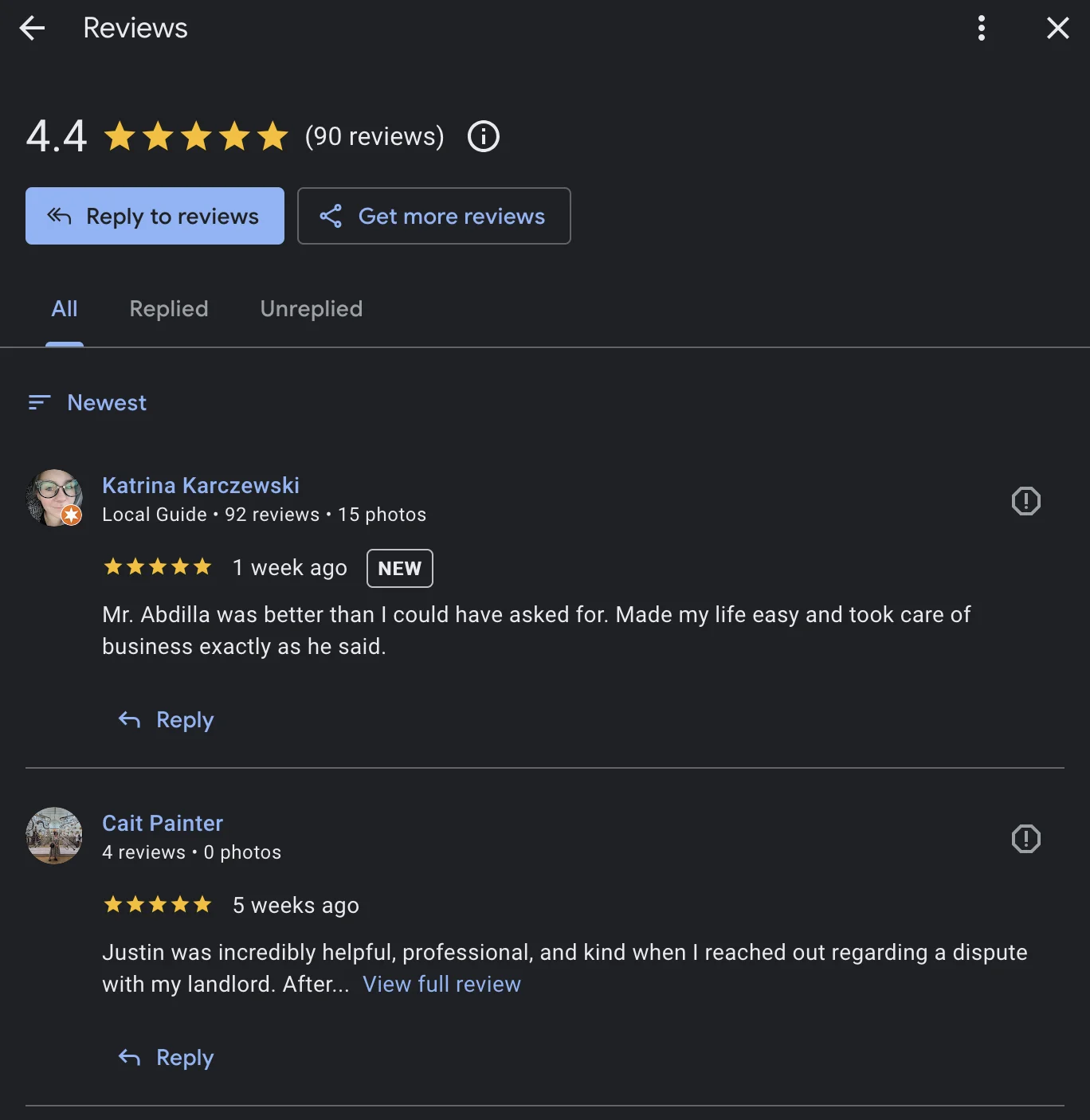
Find the fake review and click the three-dot menu
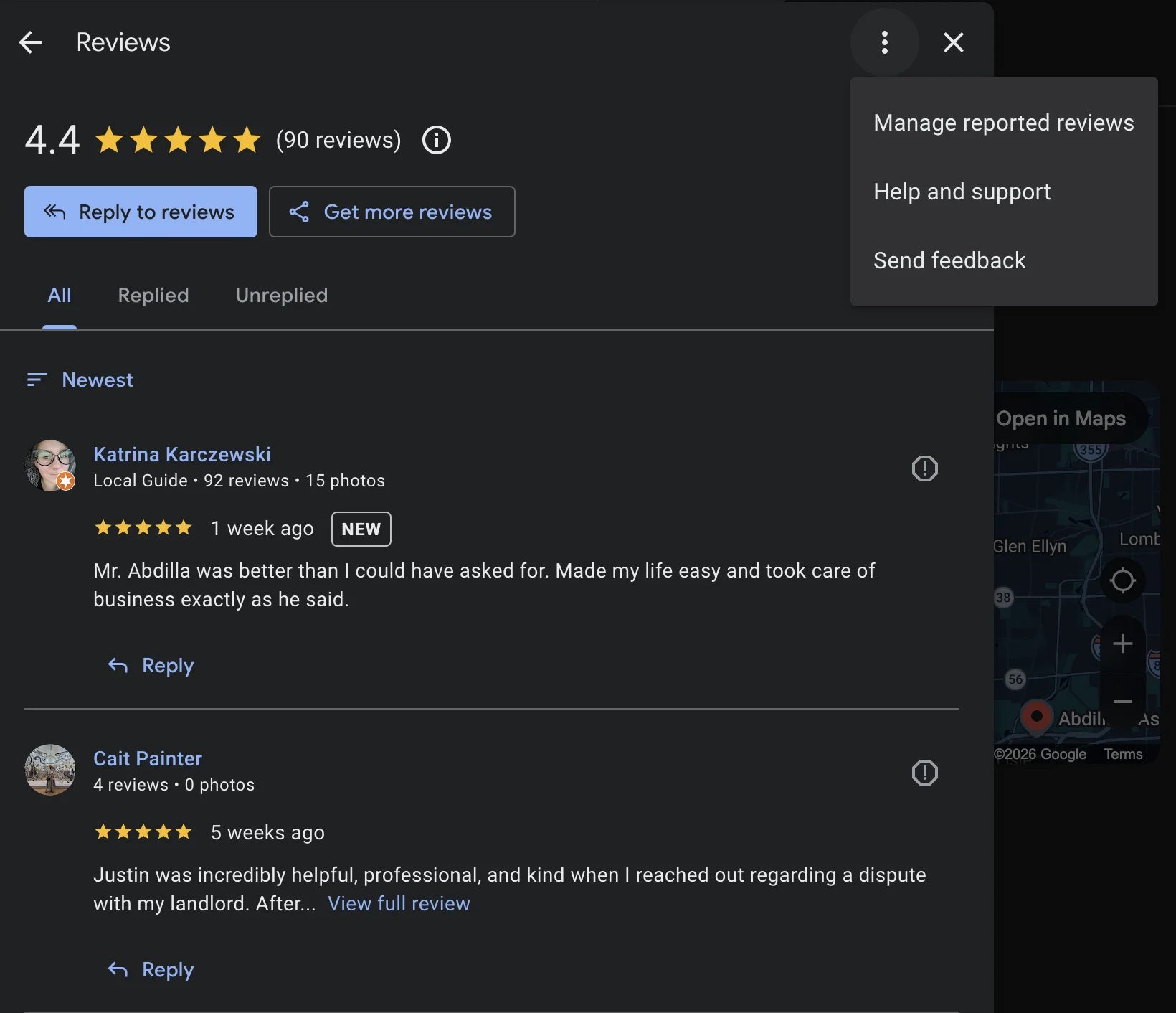
Scroll to the review you want to report. Next to the reviewer's name, you'll see three vertical dots (sometimes called the "kebab menu"). Click or tap those dots.
Select "Report review"
A dropdown appears. Click "Report review" (older versions of the interface may say "Flag as inappropriate" — it's the same function).
Choose a violation category
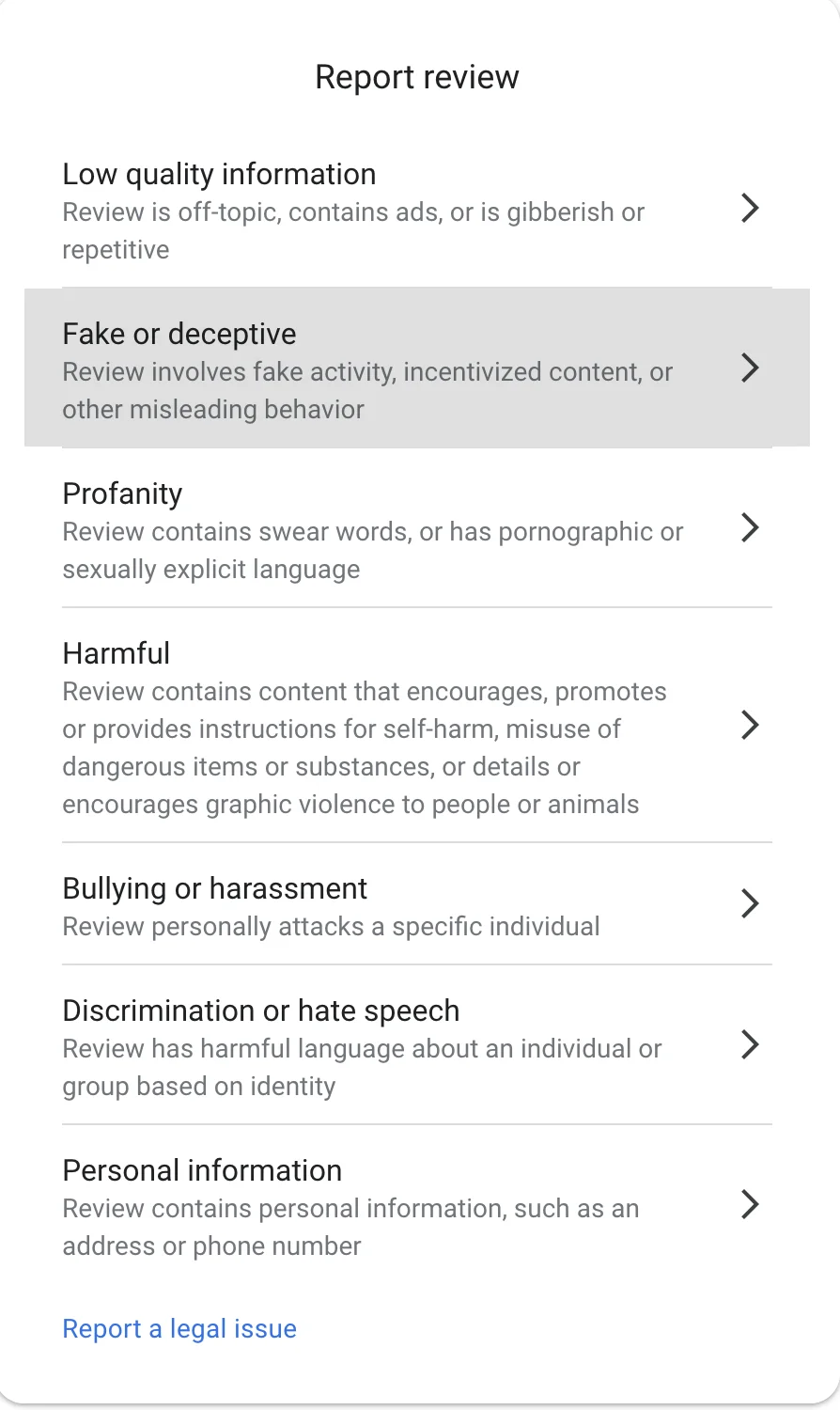
Google presents seven categories. You can only select one. Choose the most applicable violation.
| Category | When to use it |
|---|---|
| Low quality information | Review is off-topic, contains ads, or is gibberish/repetitive. Use this if the review has nothing to do with your business. |
| Fake or deceptive | Fake activity, incentivized content, or other misleading behavior. This is the category for fake reviews from non-customers and competitor-driven reviews. |
| Profanity | Contains swear words, or has pornographic or sexually explicit language |
| Harmful | Encourages self-harm, misuse of dangerous substances, or details graphic violence to people or animals |
| Bullying or harassment | Personally attacks a specific individual |
| Discrimination or hate speech | Harmful language about an individual or group based on identity |
| Personal information | Contains personal information such as an address or phone number |
For most fake review cases, select "Fake or deceptive." Google updated their categories — there is now a dedicated option for fake and incentivized reviews. If the review is completely unrelated to your business, use "Low quality information." You cannot add a written explanation during the initial flag — the form only lets you pick a category. You get to explain with evidence during the appeal.
Submit and wait
Click "Submit" or "Send report." Google says they process most reports within 3 business days. In reality, expect 1 to 3 weeks. Some businesses report reviews stuck in "Decision pending" for over two months.
How Long Does Google Actually Take? (Not 3 Days.)
Google's official documentation says "most reported reviews are processed within 3 business days." Here's what actually happens.
What Google says
Initial review: 3 business days
Appeal decision: 5 business days
What actually happens
Initial review: 5 to 20 business days
Complex cases: 2 to 4 weeks
Documented worst case: 2+ months in limbo
Obvious spam (bot-generated, link-filled) sometimes gets caught by automated filters within hours. But a fake review that looks like a real person writing a real complaint? Google's system is not designed to detect that. It passes automated screening and sits in a queue for manual review — if it gets manual review at all.
The success rate for basic flagging alone is under 10%. That number improves with appeals and escalation, but the reality is that Google's free removal process works best for obvious spam and worst for the kind of defamation that actually destroys small businesses.
Already Tried Flagging and Google Said No?
You're not alone. Google's free tool wasn't built for defamation. A cease and desist letter from a litigation attorney is. Most cases resolve in weeks, not months.
If Google Denies Your Request: The Appeal Process
You get one appeal per review. This is your single chance to make your case with evidence. Do not waste it.
Go to Google's Reviews Management Tool
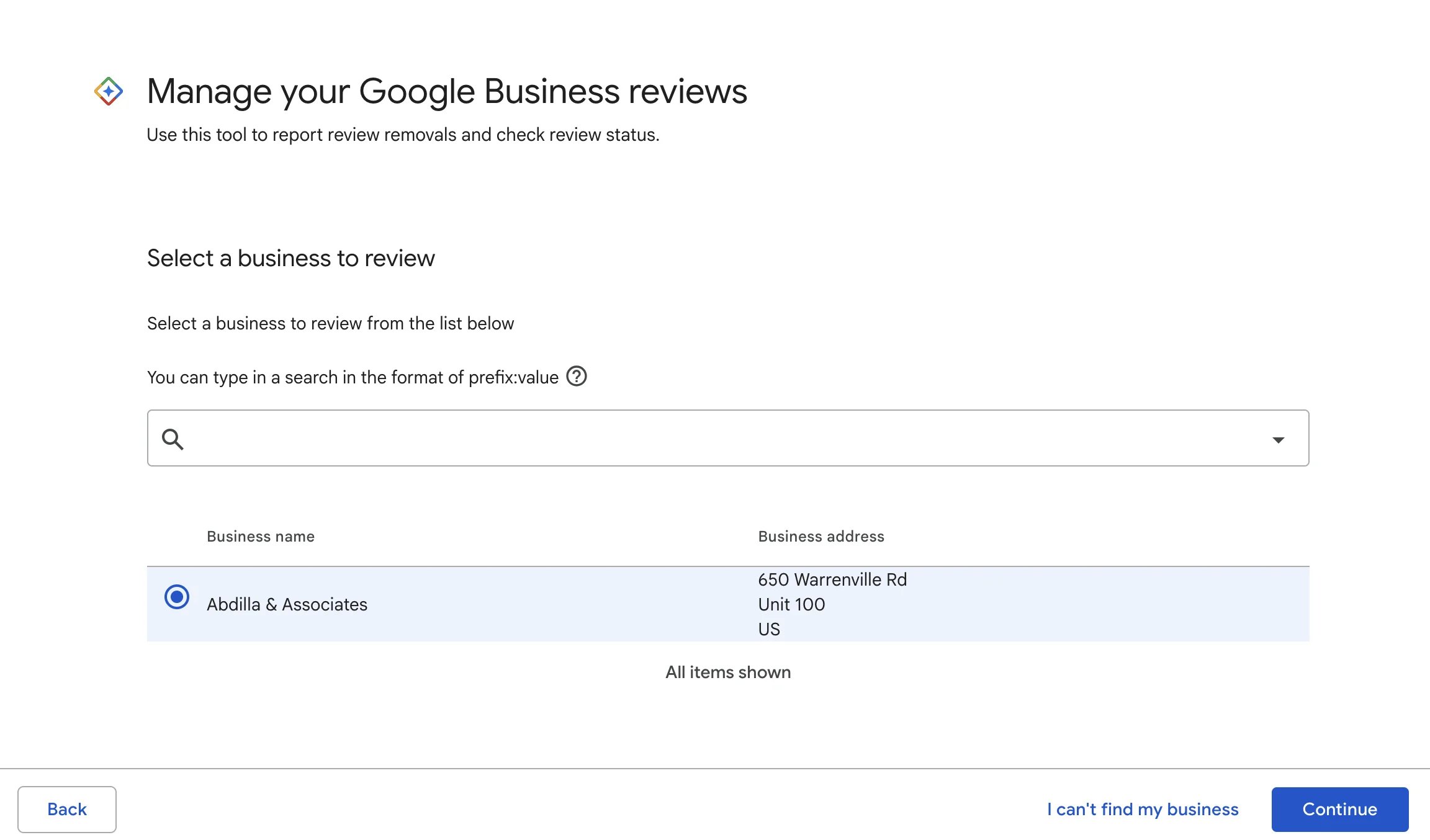
Navigate to support.google.com/business/workflow/9945796. Bookmark this URL — it is nearly impossible to find through normal Google navigation. Sign in with the account tied to your Business Profile.
Check the status of your reported review
You'll see two options. Select "Check the status of a review I've already reported and my appeal options" to see existing reports, or "Report a new review for removal" to flag a new one.
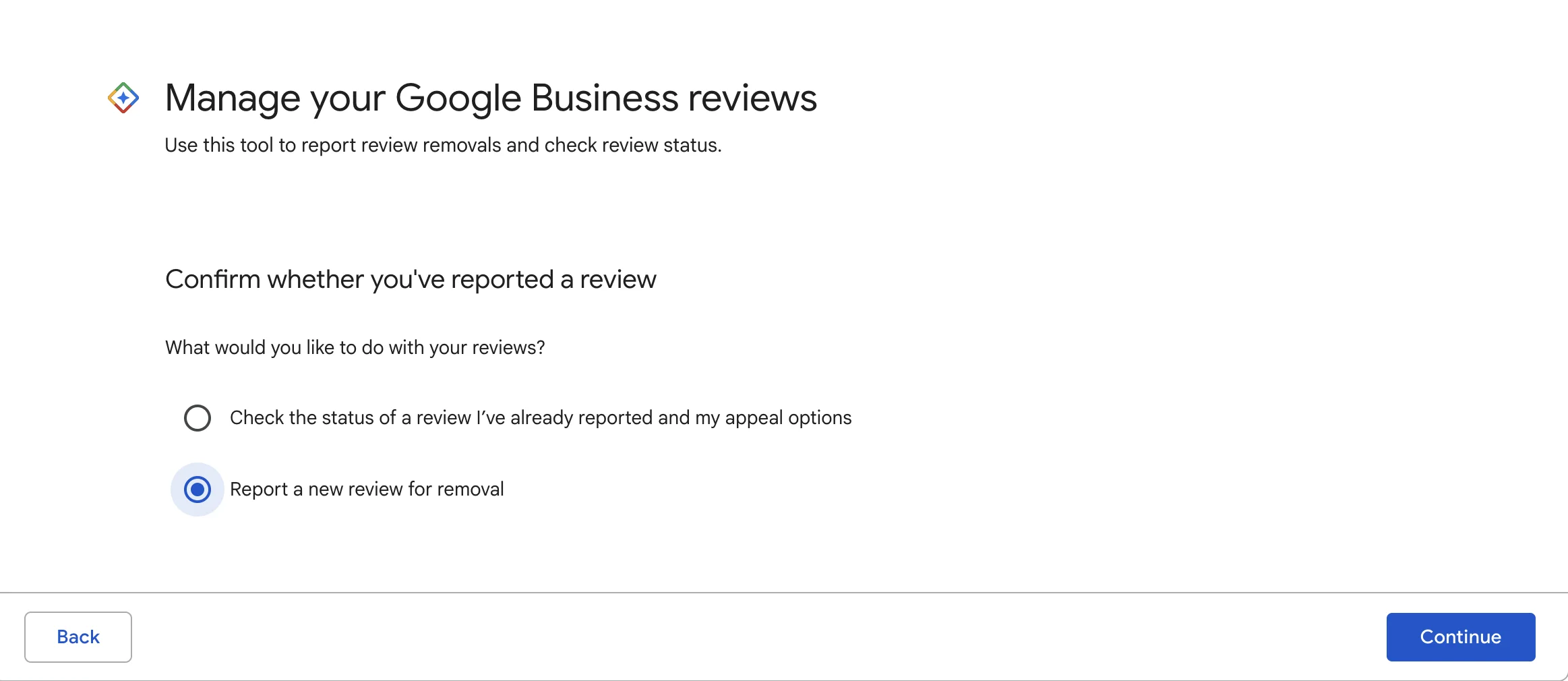
If you selected the status check, you'll see a dashboard showing all your reported reviews:
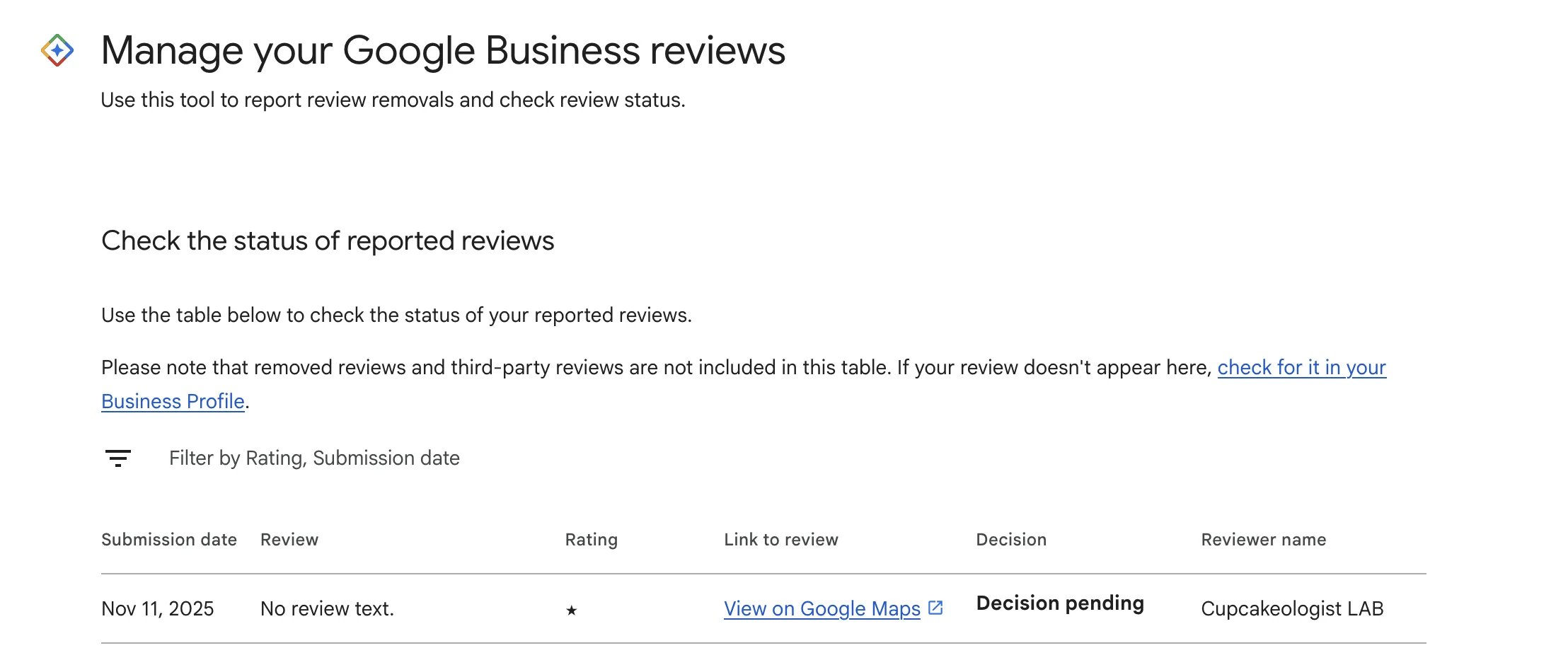
You'll see one of four statuses:
| Status | What it means |
|---|---|
| Decision pending | Still under review. You can appeal after 3 business days even if still pending. |
| No policy violation | Google reviewed it and said it's fine. You can appeal. |
| Escalated | Sent to a higher review team. Check email for updates. |
| Review removed | It worked. The review is gone. |
Click "Appeal eligible reviews" and submit your evidence
Scroll to the bottom of the page and click "Appeal eligible reviews." Select the review and write your explanation. Cite the specific Google policy violated and include evidence.
You have 60 minutes. After submitting the appeal, Google prompts you to add evidence via a linked form. That form expires in 60 minutes. Prepare all your evidence before you start the appeal: screenshots, CRM records showing no customer match, LinkedIn profiles proving competitor affiliation, or communication records showing threats.
If the appeal fails: escalate to the Community Forum
Post your case on the Google Business Profile Community Forum with your Case ID (from the appeal confirmation email). Volunteer Product Experts review cases and can escalate directly to Google's internal team. This is documented as an effective last resort within Google's system.
Someone Threatening to Post a Fake Review Unless You Give a Refund?
This is more common than you think, especially in construction, trades, and property management. A customer (or someone who was never a customer) says: "Fix this for free or I'll destroy you on Google."
That's review extortion. Do not comply.
Do not negotiate. Do not give the refund under threat. Do not respond emotionally. Instead:
- Screenshot the threat — text message, email, DM, voicemail. Preserve it immediately.
- Do not respond — anything you say can complicate your legal position.
- Call an attorney — if they follow through and post the review, you now have evidence of both defamation and extortion, which makes the legal case significantly stronger.
We handle review extortion cases regularly. The combination of a defamation claim backed by evidence of threats gives you serious legal leverage. Learn more about our false review practice or call (630) 839-9195.
When Google's Free Process Fails, Here's What Actually Works
You've flagged the review. Google ignored it. You appealed. Google denied it. You posted on the forum. Nothing happened. The fake review is still up, still damaging your rating, still costing you customers.
This is where most business owners give up. This is where we start.
Google's free removal tool was designed for spam and policy violations. It was not designed for defamation — false statements of fact published to damage your business. Section 230 means Google is not liable for what users post. But the person who posted the review has no immunity at all.
A cease and desist letter from a litigation attorney goes directly to the reviewer. It cites Illinois defamation law, identifies the false statements, and demands removal with a deadline. Nearly all false reviewers take the review down when they receive this letter. They're not prepared for a legal response. They expected you to flag it and move on.
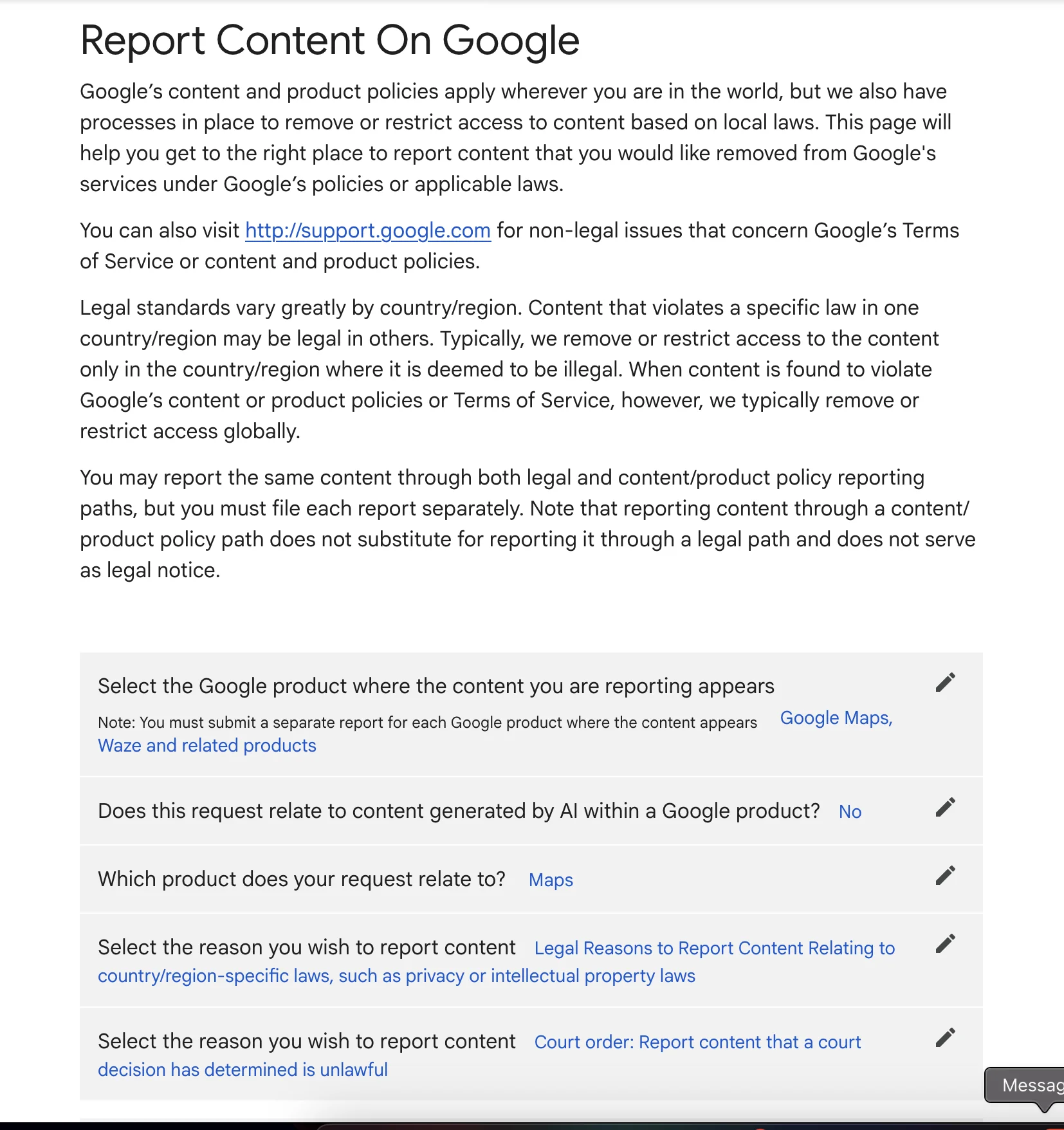
If a court order is obtained, Google provides a legal removal request form where you can submit the order directly:
Most of our false review cases resolve for $750 to $1,500. The national average for a defamation lawsuit is $14,000 to $16,000. We rarely need to go that far.
The difference: Google's free tool asks Google to decide whether a review violates their policies. A cease and desist letter tells the reviewer that Illinois law says what they posted is defamatory, and that continued publication will result in legal action. One is a suggestion to a platform. The other is a legal demand to the person who lied about your business.
Google's Tool Didn't Work. Let's Fix This.
Free 30-minute case assessment. We evaluate fake review cases every week. We'll tell you honestly whether yours is actionable and what it would cost.

Justin Abdilla
I wrote this guide because I believe you should try the free option first. If Google's tool solves your problem, you don't need me and I'm glad I could help. But I also know from handling these cases every week that Google's process fails for exactly the kind of reviews that hurt the most: carefully written lies that look like real complaints. When you're ready for a legal solution, I'm here.
Common Questions About Removing Fake Google Reviews
Sometimes. Google removes reviews that violate their content policies — spam, fake engagement, conflict of interest, harassment. But Google does not verify whether a review is true or false. Their tool was built for spam, not defamation. If someone posts a lie about your business that doesn't technically violate Google's policies, Google will likely leave it up. That's when you need a lawyer.
Google says 3 business days. In practice, it takes 5 to 20 business days for most cases. Some businesses report reviews stuck in 'Decision pending' for over two months. If Google denies your removal request, you get one appeal — and you have 60 minutes to submit your evidence after filing it. Prepare everything before you start.
You get one appeal through the Reviews Management Tool. After that, you can escalate to the Google Business Profile Community Forum where volunteer Product Experts can push your case to Google's review team. If all of that fails, the next step is legal action — a cease and desist letter from an attorney, or a court order that Google is legally required to honor.
A lawyer doesn't speed up Google's internal process. What a lawyer does is bypass it entirely. A cease and desist letter goes directly to the person who posted the review and demands removal under threat of defamation litigation. Nearly all false reviewers take the review down when they receive that letter. The review comes down in days or weeks, not months of waiting on Google.
That's review extortion, and it may be illegal under Illinois law. Do not negotiate. Do not give the refund under threat. Screenshot the threat (text, email, DM), preserve the evidence, and call an attorney. If they follow through and post the review, you now have evidence of both defamation and extortion — which makes the legal case significantly stronger.
Related Resources
Fake Google Review Lawyer Chicago — Our main practice page for false review defamation cases.
Google Reviews Management Tool — Bookmark this. You'll need it to check status and file appeals.
Google's Review Content Policies — The official list of what Google considers a policy violation.
Your Business Reputation Is Worth Protecting
If the free process worked, great. If it didn't, Illinois defamation law gives you real remedies. Free case review. Straight answers.